





Still buried under a pile of customer inquiries? Manual responses eat up valuable time, slow down your team, and can leave customers waiting. Imagine a system that handles routine questions, sorts urgent issues, and even processes simple requests—all without a human touching a keyboard. That’s the power of automated customer support, and it’s simpler to set up than you think.
This guide will show you how to use automation to streamline your customer interactions, cut costs, and keep your clients happy around the clock. Small to medium-sized businesses (SMBs), especially in Real Estate and Healthcare, often struggle with missed calls and lost leads after hours, leading to significant revenue loss; Growth Design Studio specializes in deploying Voice AI Agents that operate 24/7, capturing and qualifying these leads instantly, often saving clients over 20+ hours per week and delivering a 200-400% ROI in Year 1. By the end, you’ll understand the core technologies, practical benefits, and exact steps to implement effective automated support in your business.
Understanding Automated Customer Support
Automated customer support uses technology to handle customer service tasks with minimal or no human involvement. This approach helps businesses manage inquiries efficiently and consistently. It’s about letting smart systems do the heavy lifting for common questions and routine processes, freeing your team for complex issues.
Defining Automated Customer Service
At its heart, automated customer service is any support process improved by automation or artificial intelligence (AI). For instance, a roofing company can use AI to automatically schedule estimate appointments or answer common questions about materials, significantly reducing manual administrative tasks and improving customer response times. This means technology steps in to answer questions, guide users, or manage service requests automatically. It’s a way to give customers fast, consistent help without always needing a human agent. In essence, it uses smart tools to manage service inquiries, making sure customers get what they need quickly.
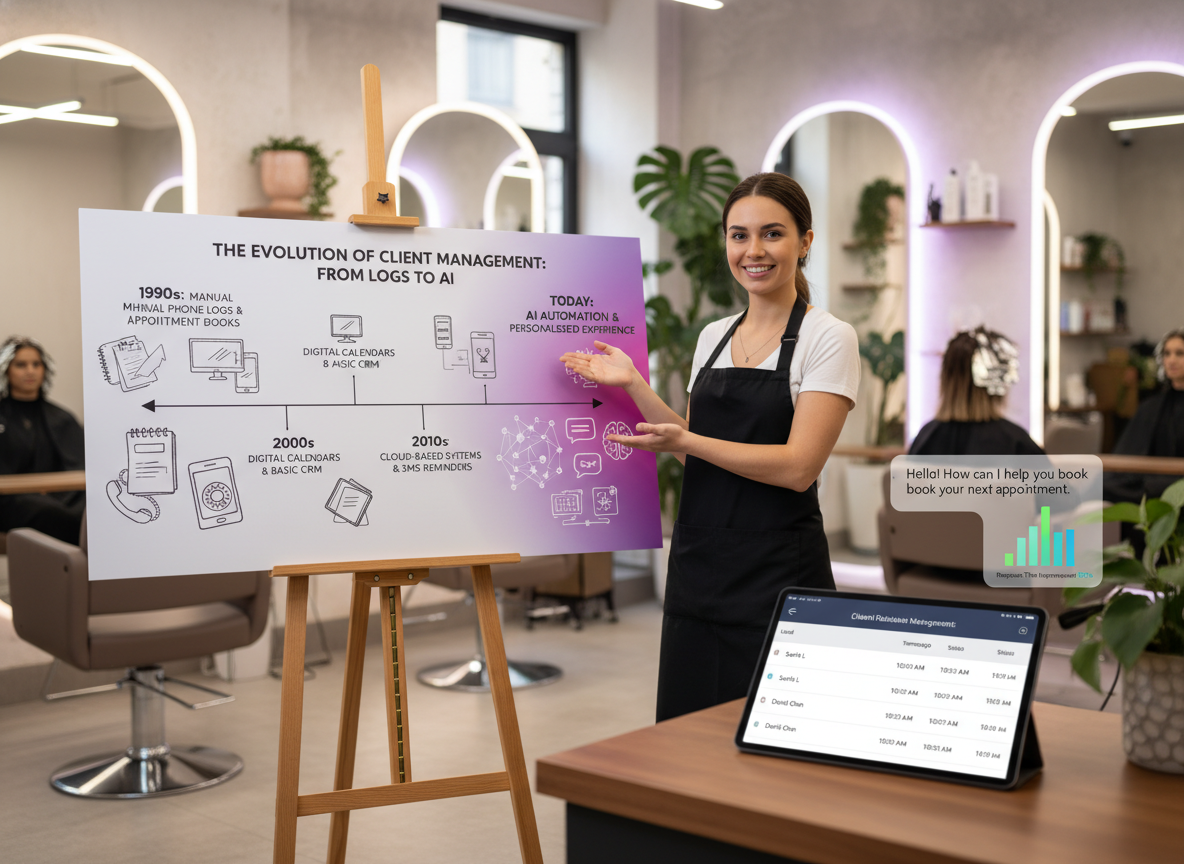
The Evolution of Customer Support Automation
Customer support has come a long way from just phone calls. Early automation involved basic IVR (Interactive Voice Response) systems. Today, we have sophisticated AI and chatbots that can understand natural language and provide personalized assistance. This evolution has shifted from simple rule-based systems to intelligent platforms capable of learning and adapting, offering better customer experiences. Businesses now use technology to perform many customer support tasks, often with limited human interaction.
Core Technologies Powering Automated Support (AI, Chatbots, Self-Service)
Several key technologies drive modern automated customer support:
- Artificial Intelligence (AI): AI allows systems to understand context, analyze customer sentiment, and provide more human-like interactions. It powers many advanced features in automated support.
- Chatbots: These AI-powered tools simulate conversations with users, answering questions or guiding them through processes via text or voice. Chatbots can handle common questions and route complex issues to human agents.
- Self-Service Portals: Knowledge bases, FAQs, and online guides empower customers to find answers independently. This reduces the number of direct inquiries and improves customer satisfaction.
- Automated Email Responders: These send instant replies to common questions or confirm receipt of an inquiry, providing immediate acknowledgment.
These tools work together to create a seamless and efficient support system. However, for SMBs, the technical implementation of such systems must be straightforward and integrate easily with existing CRMs like Zoho or HubSpot, a key differentiator offered by Growth Design Studio, ensuring quick deployment within 3-7 days without extensive IT overhead.
Key Benefits of Automated Customer Support
Implementing automated customer support offers tangible benefits that directly impact your business’s bottom line and customer relationships. It’s about more than just saving money; it’s about improving the entire service experience.
Boosting Operational Efficiency and Reducing Costs
One of the most immediate advantages of automation is the boost in efficiency. Automated systems can handle a large volume of routine inquiries simultaneously, reducing the workload on human agents. This means your team can focus on more complex, high-value tasks. By automating basic requests, businesses can significantly reduce operational costs associated with staffing and training a large support team. For automotive dealerships, automating initial inquiry handling and service scheduling can lead to a 50% cost reduction in customer service operations, freeing up valuable staff to focus on sales and high-value customer interactions, while saving 20+ hours per week in manual tasks. Studies show automation can cut follow-up times by a substantial margin, leading to cost savings.
Enhancing Customer Experience and Satisfaction
Customers expect fast, accurate, and consistent support. Automated systems deliver this by providing instant responses and clear information. When customers can quickly find answers to their questions through a self-service portal or get immediate help from a chatbot, their satisfaction increases. For local service businesses like plumbing or HVAC, a Voice AI Agent can instantly provide service availability, pricing, and even book appointments, ensuring 24/7 customer engagement and avoiding missed opportunities due to scheduling chaos. This leads to happier customers who feel heard and supported, even outside of business hours. Automated support systems can instantly verify orders, check refund eligibility, and offer clear steps without needing a physical agent.
Ensuring 24/7 Availability and Consistent Service
Your business never sleeps, and neither should your customer support. Automated systems provide round-the-clock availability, ensuring customers in different time zones or those with late-night questions always have access to help. This constant availability means no customer is left waiting, improving their overall experience and demonstrating a commitment to service. Plus, automated responses are always consistent, ensuring every customer receives the same high-quality information. This consistency is particularly vital for e-commerce businesses managing a high volume of inquiries, guaranteeing that every customer interaction, from order status to return policies, is handled uniformly and efficiently, contributing to a substantial 200-400% ROI in the first year by converting more leads.

Implementing Automated Customer Support Effectively
Implementing automated customer support doesn’t have to be complicated. By understanding the common tools and following a clear process, you can build a system that genuinely helps your business.
Common Types of Automation in Customer Service (e.g., Chatbots, IVR, Auto-responders)
Automated customer service takes many forms, each designed to address specific needs:
- Chatbots: These virtual assistants can answer FAQs, guide users to relevant resources, or collect information before escalating to a human agent. They are excellent for instant, real-time support.
- IVR (Interactive Voice Response): Found in phone systems, IVR directs callers to the right department or provides pre-recorded information, reducing wait times.
- Auto-responders: These automatically send a predefined email response to inquiries, confirming receipt and sometimes providing immediate solutions.
- Self-service portals: These are online knowledge bases where customers can search for answers, troubleshooting guides, and FAQs.
- Auto-routing: This feature automatically directs incoming tickets or calls to the most appropriate human agent or department based on keywords or customer history.
- Canned messages: Pre-written responses for common questions that human agents can quickly deploy, ensuring consistency and speed.
Many of these tools, including chatbots, autoresponders, and self-service portals, are integral to a complete automated customer service solution . More advanced solutions include AI voice assistants and AI-backed sentiment analysis.
A Step-by-Step Guide to Implementation
Setting up automated customer support can be broken down into clear steps:
1. Identify Pain Points: First, figure out where your customer support currently struggles. What are the most common questions? Where do customers get stuck? This helps you prioritize what to automate.
2. Map Common Workflows: Outline the typical paths customers take. For example, “Customer asks about order status” → “System checks order ID” → “System provides status.”
3. Choose the Right Tools: Select software that aligns with your needs and budget. Consider options like dedicated customer service platforms or automation tools like n8n if you need custom workflows.
4. Design Your Automation: Build out your chatbots, self-service articles, and auto-response templates. Keep the language clear and helpful.
5. Test Thoroughly: Before launching, test your automated flows with real-world scenarios. Make sure it works as expected and provides accurate information.
6. Launch and Monitor: Roll out your automated system and keep a close eye on its performance. Gather feedback from customers and your support team.
7. Iterate and Improve: Automation isn’t a one-time setup. Continuously review performance data, refine responses, and add new automated solutions as your business grows.
Choosing the Right Automation Tools and Platforms
The market offers many tools for customer service automation. Options range from comprehensive platforms like Zendesk and HubSpot to specialized chatbot builders and workflow automation tools. When choosing, consider:
- Integration: Does it connect with your existing CRM, marketing tools, or other business software? HubSpot’s automated customer service, for example, helps with ticket routing and customer feedback.
- Scalability: Can the tool grow with your business?
- Ease of Use: Is it user-friendly for both your team and your customers?
- Features: Does it offer the specific automation types you need, like AI chatbots or robust self-service options?
- Cost: Does it fit your budget?
Platforms like DevRev, Salesforce Service Cloud, Zoho Desk, Zendesk, Intercom, and Live Agent are among the top choices for customer service automation software.

Best Practices & Future Trends in Automation
Automated customer support isn’t a “set it and forget it” solution. To get the most out of it, you need to apply best practices and stay aware of future developments.
Measuring Success and Continuous Optimization Strategies
To ensure your automated support works, you need to measure its impact. Key metrics include:
- Resolution Rate: How many issues are resolved without human intervention?
- Customer Satisfaction (CSAT): Are customers happy with the automated support?
- Response Time: How quickly do automated systems address inquiries?
- Cost Savings: What financial benefits are you seeing from reduced human agent workload?
Regularly analyze these metrics to identify areas for improvement. Continuously refine chatbot scripts, update knowledge base articles, and adjust routing rules to optimize performance. User feedback is invaluable here; use it to improve your system.
Common Pitfalls to Avoid in Customer Support Automation
While automation offers many benefits, it’s not without its challenges. Avoid these common pitfalls:
- Over-automating: Don’t try to automate every single interaction. Complex or sensitive issues still need a human touch. Balance automation with human agents to provide effective support.
- Ignoring Feedback: If customers or agents complain about the automated system, listen and make changes.
- Lack of Personalization: Generic, robotic responses can frustrate customers. Design your automation to feel as personalized as possible, using customer data when appropriate.
- Outdated Information: An automated system is only as good as the information it provides. Keep your knowledge base and chatbot scripts current.
The Future Landscape: Advanced AI and Predictive Support
The future of automated customer support is exciting, with advanced AI playing an even bigger role. We’ll see the rise of Agentic AI systems, as highlighted in recent news regarding Swisscom’s enterprise solutions, indicating a trend towards more autonomous and complex problem-solving capabilities in automated customer support for 2025. We’ll also see:
- More Sophisticated AI: AI will better understand nuances in human language and intent, leading to more natural and effective conversations. Our article on Voice Agents: Benefits, Use Cases, & Future of Conversational AI delves deeper into this.
Predictive Support: AI will analyze customer behavior and historical data to anticipate needs and proactively offer solutions before* a customer even asks a question.
- Seamless Human-AI Collaboration: The line between human and AI support will blur, with agents using AI tools to enhance their capabilities and AI seamlessly handing off to humans when needed.
These advancements will make customer support even more efficient, personalized, and proactive.

Frequently Asked Questions
What is the best AI for customer support?
The “best” AI for customer support depends on your specific business needs, budget, and existing infrastructure. Popular options include comprehensive platforms like Zendesk and HubSpot, which offer integrated AI features, as well as specialized AI chatbots and voice agents. Solutions that offer seamless CRM integration and rapid deployment, like those from Growth Design Studio, are highly effective for SMBs.
How do automated customer support chatbots work?
Automated customer support chatbots work by using AI and natural language processing (NLP) to understand customer inquiries. They are programmed with predefined responses, access knowledge bases, and can be integrated with backend systems to provide information, perform tasks like scheduling, or route complex queries to human agents. Modern chatbots can also learn and adapt over time through machine learning to improve their accuracy and effectiveness.
Conclusion
Automated customer support is no longer a luxury; it’s a smart strategy for any business looking to streamline operations, reduce costs, and deliver an excellent customer experience. By carefully implementing AI, chatbots, and self-service options, you can ensure your customers receive instant, consistent, and helpful support around the clock. The key is to balance automation with human expertise and continuously optimize your systems for the best results.
For SMBs, adopting AI automation ensures not only current operational efficiency but also future scalability, allowing businesses in sectors like coaching or restaurants to expand their reach and maintain high customer engagement without proportional increases in staffing, ultimately contributing to a robust 200-400% ROI.
Want to set up smart automation that saves your business time and money? Book your free automation audit today.
Need Help With Automation?
Book a free automation audit of your business with us today. No sales pitch, just sharing helpful tips to automate your business processes.